

Table of Contents
Ergonomic wrist rests look simple, but they sit at the intersection of biomechanics, workstation design, and daily habits. Used well, they can reduce pressure on your wrists and make long sessions at the keyboard or mouse less taxing. Used poorly, they can become posture traps that lock your hands in awkward angles. This guide walks through what happens when you type without wrist support, how wrist rests help, when they’re worth the money, and how to choose and position one so it works with your body instead of against it. You’ll know whether a wrist rest belongs in your setup—and what else you may want to adjust.
The Real Problem: What Happens Without Wrist Support

Long hours at a desk load your wrists and forearms in two ways: static muscle tension and contact stress. When your forearms hover over the desk while you type, the small muscles that stabilize your hands never get a break. When you drop your wrists to rest on a sharp desk edge, you compress soft tissues, nerves, and blood vessels. Over time this combination can contribute to soreness, tingling, and overuse injuries.
The underlying issue is usually poor alignment, not a lack of cushioning. A healthy “neutral wrist posture” keeps your hand in line with your forearm—no bending up (extension), down (flexion), or sideways. This lets tendons glide smoothly and keeps pressure off the median nerve. For a visual guide, see PostureUp’s breakdown of neutral wrist posture and keyboard alignment.
Without support, many people unconsciously rest their palms or wrists in ways that break this neutral line. Common examples include planting the heel of the hand on the desk while mousing, letting the wrist sag when typing on a high keyboard, or twisting the hand outward because the keyboard is off-center. These habits increase friction, strain, and pressure that accumulate over time.
Another problem is desk-height mismatch. If your desk is too high, you shrug your shoulders and extend your wrists to reach the keyboard. Too low, and you lean forward, flexing wrists down to type. Wrist rests alone cannot fix a badly sized desk, but they can help bridge the gap between your forearm and work surface once chair height, screen position, and keyboard distance are reasonably tuned.
How Ergonomic Wrist Rests Actually Help (When Used Correctly)
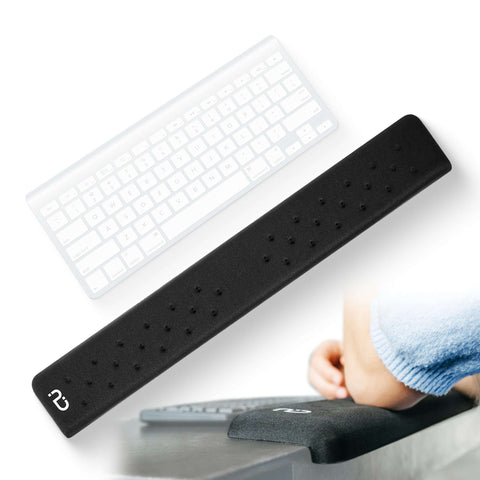
An ergonomic wrist rest is less about “resting” your wrists and more about supporting your forearms just enough to maintain alignment. Placed in front of your keyboard or mouse, it slightly raises the contact point between your arm and the desk so your hand can float over the keys or mouse in a neutral line. This keeps the bony part of your wrist off the desk edge and spreads pressure across a broader, cushioned surface instead of a thin strip of tissue.
Good rests also cut down contact stress from hard surfaces. Desk edges and unpadded laptop chassis can dig into the carpal tunnel region, especially during mouse-heavy work. A well-fitted rest relieves that pressure, which many people feel as immediate relief from burning or bruised sensations along the base of the palm. PostureUp’s ergonomics guide on the hidden risks of desk edges explains why that seemingly minor ridge can be such a big problem.
Correct use is key. Your palms—not the delicate center of the wrist—should make primary contact with the rest. Your fingers should reach the keys or mouse without stretching or cocking the wrist up. Keep your elbows close to your sides and your forearms level with the desk so the rest supports, rather than bends, your wrists. This setup reduces effort in your forearm muscles and lets you relax your shoulders.
Common Wrist Rest Myths, Debunked
One persistent myth is that “wrist rests cause carpal tunnel.” Poorly designed or misused rests that press directly on the carpal tunnel area can aggravate symptoms, but appropriately sized rests that keep that region off the edge can reduce aggravation. Another misconception is that soft gels are always better. Very squishy rests can let the wrist sink and bend, increasing extension; medium-firm support that keeps the hand level is usually safer.
Wrist rests are not a standalone fix for pain. They support good posture but cannot compensate for an overly high keyboard, a chair with no arm support, or long, unbroken typing marathons. Viewing them as one tool in an integrated setup—alongside posture-aware habits and movement breaks—prevents overreliance.
Pros
- Can reduce contact stress from sharp desk and laptop edges
- Helps maintain neutral wrist alignment for typing and mousing
- Decreases muscle effort by lightly supporting forearms
- Improves comfort for high desk–time roles (coding, design, data entry)
- Pairs well with other ergonomic upgrades like PostureUp EdgeRest or WavePads
Cons
- Wrong height can increase wrist bend instead of reducing it
- Overreliance can discourage movement and micro-breaks
- Very soft or worn-out padding may collapse and misalign the hand
- Not a cure-all for nerve issues or severe repetitive strain injuries
- Can clutter small workspaces if poorly sized for the desk
When a Memory Foam Wrist Rest Is Worth the Investment

A wrist rest becomes a smart investment when discomfort follows a clear pattern in desk-heavy work. Signs include aching or burning across the base of your palms after typing, tingling or numbness when your wrists rest on the desk edge, or red grooves on your skin where the desk contacts your forearm. If these symptoms ease when you pad the edge with a folded cloth or adjust your posture, a purpose-built rest can provide more consistent support.
You’re also a strong candidate if your work is high repetition: programmers, writers, data-entry specialists, gamers, and design professionals often benefit because small posture improvements compound over thousands of keystrokes. If you’ve already adjusted chair height, keyboard distance, and monitor position but still feel pressure at the wrist, adding a rest is a logical next step. Laptop users who dock to external keyboards can also gain comfort by pairing a rest with a better input layout.
There are instances where a wrist rest may not help or may even backfire. If your pain includes night numbness, weakness, or symptoms that extend into the shoulder or neck, see a medical or occupational health professional before relying on equipment tweaks. A rest that’s too tall can increase wrist extension and aggravate tendons; an overly deep rest can tempt you to plant your wrists and reach for distant keys, rather than moving your whole arm. The PostureUp article on whether laptop users really need a wrist rest outlines several of these edge cases.
Some workflows don’t call for a rest. If you spend most of your desk time reading, on calls, or writing with pen and paper, you may get more benefit from chair, display, or foot support changes. And if your desk surface is already soft, beveled, and at an ideal height, adding more padding may offer little extra value.
- ✅ Persistent pressure marks on your wrists or forearms after work
- ✅ Pain that eases when you pad the desk edge temporarily
- ✅ High daily keyboard or mouse use (several hours or more)
- ✅ Reasonable chair and monitor setup, but lingering local wrist discomfort
- ✅ Willingness to tweak habits instead of using the wrist rest as a crutch
Choosing the Right Wrist Rest for Your Setup

Once you’ve decided a wrist rest is worth trying, focus on fit and how it integrates with your desk, not just materials or aesthetics. Height is the most important factor: the top of the rest should sit roughly level with, or slightly below, the front edge of your keyboard or mouse surface. This lets your hand glide without bending the wrist up or down.
Firmness is next. Look for medium-firm cushioning that compresses just enough to feel comfortable, then “pushes back” to keep your wrist and palm level. Overly soft gel can bottom out and press your wrist into the hard base; too hard, and you just recreate the desk edge problem. Smooth but grippy surface materials reduce skin irritation and keep the rest from sliding as you type or mouse.
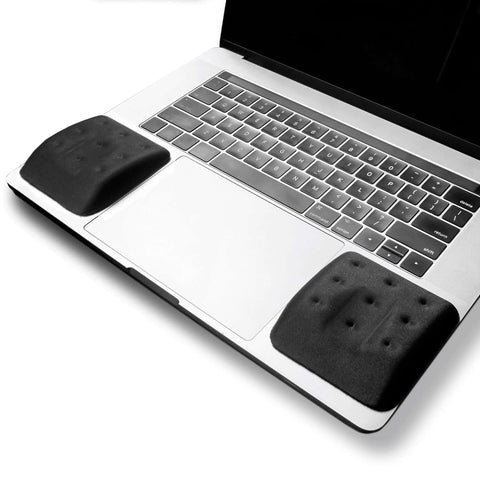
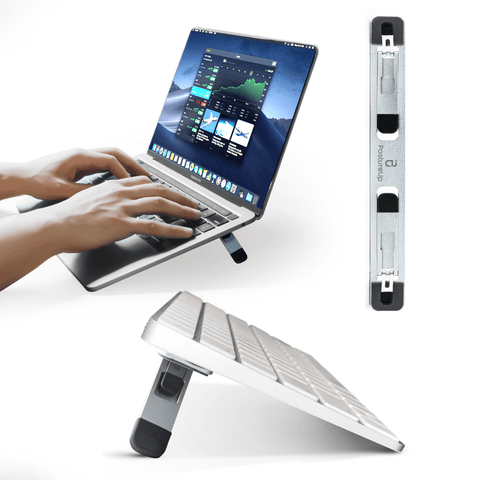
Consider your desk depth and layout. For compact setups, slim, edge-focused supports like PostureUp’s EdgeRest can soften the front desk edge without overwhelming space. For dedicated keyboard and mouse support, contoured options such as PostureUp WavePads can better match natural hand angles. If you’re elevating a low monitor or laptop with a riser like the PostureUp ProRiser, make sure your forearms still align level with the keyboard once everything is in place, then choose a rest height that fits that new geometry.
Positioning finishes the job. Place the rest directly in front of the spacebar or mouse, leaving a small gap so your palms touch the rest when your fingers are on the keys or buttons. Avoid planting your wrists and reaching for distant keys; move your hands and forearms as units. Pair the setup with broader ergonomic upgrades—such as the EdgeRest for desk-edge comfort and the ErgoBrace or armrests for forearm support—so your shoulders, elbows, and wrists share the workload.
Targeted changes to wrist support can unlock meaningful comfort gains, but they work best as part of a full-picture view of your workstation. Instead of guessing which adjustments matter most, you can run a quick digital checkup with ErgoAudit. In a few guided steps, it helps you evaluate chair height, monitor position, keyboard and wrist alignment, and whether a wrist rest—or other tweaks like EdgeRest, WavePads, ProRiser, or ErgoBrace—will actually move the needle in your setup.
Ready to improve your workspace?
Explore our full range of ergonomic products designed for comfort and productivity.
Browse Our Collection